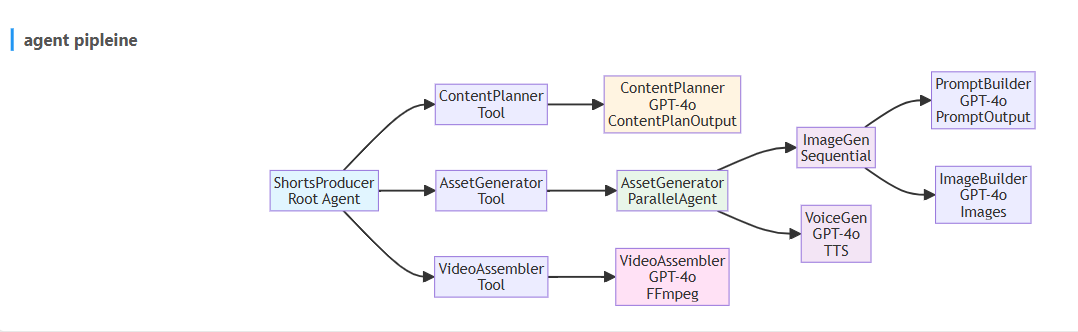
agent pipline

full code
YouTube Shorts Maker - Complete Code Collection
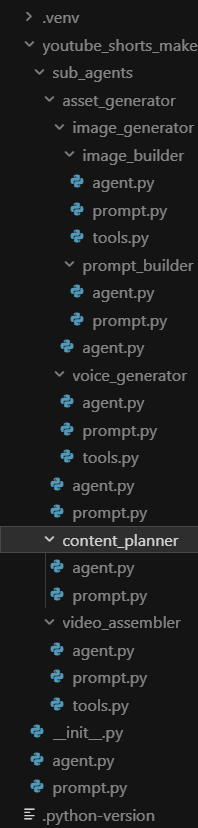
This document contains all Python code files from the project, organized by file path for easy copy-paste.
youtube_shorts_maker/__init__.py
from . import agentyoutube_shorts_maker/agent.py
from google.genai import types
from google.adk.agents import Agent
from google.adk.tools.agent_tool import AgentTool
from google.adk.models.lite_llm import LiteLlm
from .sub_agents.content_planner.agent import content_planner_agent
from .sub_agents.asset_generator.agent import asset_generator_agent
from .sub_agents.video_assembler.agent import video_assembler_agent
from .prompt import SHORTS_PRODUCER_DESCRIPTION, SHORTS_PRODUCER_PROMPT
from google.adk.agents.callback_context import CallbackContext
from google.adk.models.llm_request import LlmRequest
from google.adk.models.llm_response import LlmResponse

MODEL = LiteLlm(model="openai/gpt-4o")


def before_model_callback(
    callback_context: CallbackContext,
    llm_request: LlmRequest,
):
    history = llm_request.contents
    last_message = history[-1]
    if last_message.role == "user":
        text = last_message.parts[0].text
        if "hummus" in text:
            return LlmResponse(
                content=types.Content(
                    parts=[
                        types.Part(text="Sorry I can't help with that."),
                    ],
                    role="model",
                )
            )
    return None


shorts_producer_agent = Agent(
    name="ShortsProducerAgent",
    model=MODEL,
    description=SHORTS_PRODUCER_DESCRIPTION,
    instruction=SHORTS_PRODUCER_PROMPT,
    tools=[
        AgentTool(agent=content_planner_agent),
        AgentTool(agent=asset_generator_agent),
        AgentTool(agent=video_assembler_agent),
    ],
    before_model_callback=before_model_callback,
)

root_agent = shorts_producer_agent
youtube_shorts_maker/prompt.py
SHORTS_PRODUCER_DESCRIPTION = (
    "Primary orchestrator for creating vertical YouTube Shorts videos (9:16 portrait format) through a 5-phase workflow. "
    "Guides users through requirements gathering, coordinates specialized sub-agents in sequence "
    "(ContentPlanner → AssetGenerator → VideoAssembler), provides progress updates, "
    "handles error recovery, and delivers the final vertical MP4 video file."
)

SHORTS_PRODUCER_PROMPT = """
You are the ShortsProducerAgent, the primary orchestrator for creating vertical YouTube Shorts videos (9:16 portrait format).

## Your Workflow:
1. **Phase 1**: Greet user and gather requirements
2. **Phase 2**: Use ContentPlannerAgent to create structured script
3. **Phase 3**: Use AssetGeneratorAgent to generate images and audio in parallel
4. **Phase 4**: Use VideoAssemblerAgent to assemble final MP4 video
5. **Phase 5**: Present final result to user

## Important Guidelines:
- Always use agents in sequence: ContentPlanner → AssetGenerator → VideoAssembler
- Provide progress updates and handle errors gracefully
- Maintain a helpful and professional tone throughout

Begin by greeting the user and asking about their YouTube Short requirements.
"""
youtube_shorts_maker/sub_agents/content_planner/agent.py
from google.adk.agents import Agent
from google.adk.models.lite_llm import LiteLlm
from .prompt import CONTENT_PLANNER_DESCRIPTION, CONTENT_PLANNER_PROMPT
from pydantic import BaseModel, Field
from typing import List


class SceneOutput(BaseModel):
    id: int = Field(description="Scene ID number")
    narration: str = Field(description="Narration text for the scene")
    visual_description: str = Field(
        description="Detailed description for image generation"
    )
    embedded_text: str = Field(
        description="Text overlay for the image (can be any case/style)"
    )
    embedded_text_location: str = Field(
        description="Where to position the text on the image (e.g., 'top center', 'bottom left', 'middle right', 'center')"
    )
    duration: int = Field(description="Duration in seconds for this scene")


class ContentPlanOutput(BaseModel):
    topic: str = Field(description="The topic of the YouTube Short")
    total_duration: int = Field(description="Total video duration in seconds (max 20)")
    scenes: List[SceneOutput] = Field(
        description="List of scenes (agent decides how many)"
    )


MODEL = LiteLlm(model="openai/gpt-4o")

content_planner_agent = Agent(
    name="ContentPlannerAgent",
    description=CONTENT_PLANNER_DESCRIPTION,
    instruction=CONTENT_PLANNER_PROMPT,
    model=MODEL,
    output_schema=ContentPlanOutput,
    output_key="content_planner_output",
)
youtube_shorts_maker/sub_agents/content_planner/prompt.py
CONTENT_PLANNER_DESCRIPTION = (
    "Creates complete structured content plan for vertical YouTube Shorts videos (9:16 portrait format) in one step. "
    "Analyzes topic for key teaching points, determines optimal number of scenes and timing, "
    "generates narration text for each scene, designs vertical visual descriptions, "
    "and plans embedded text overlays. Outputs structured JSON format with max 20 seconds total."
)

CONTENT_PLANNER_PROMPT = """
You are the ContentPlannerAgent, responsible for creating complete structured content plans for vertical YouTube Shorts videos (9:16 portrait format).

## Your Task:
Given a topic from the user, create a comprehensive vertical YouTube Shorts script (9:16 portrait format) with a MAXIMUM of 20 seconds total duration.

## Output Format:
Return a valid JSON object with this structure:
{
  "topic": "[the provided topic]",
  "total_duration": "[sum of all scene durations - MUST be ≤ 20]",
  "scenes": [
    {
      "id": 1,
      "narration": "[narration text matching scene duration]",
      "visual_description": "[description for image generation]",
      "embedded_text": "[text overlay for image]",
      "embedded_text_location": "[position: top center, bottom left, etc.]",
      "duration": "[seconds for this scene]"
    }
  ]
}

## Guidelines:
- **CRITICAL**: Total duration MUST NOT exceed 20 seconds
- Scene count: 3-6 scenes typically work best
- Narration: Match word count to scene duration (2-3 words per second)
- Visual descriptions: Be specific for vertical image generation
- Embedded text: 2-8 words max, attention-grabbing, NO emojis

Return only the JSON object, no additional text.
"""
youtube_shorts_maker/sub_agents/asset_generator/agent.py
from google.adk.agents import ParallelAgent
from .prompt import ASSET_GENERATOR_DESCRIPTION
from .image_generator.agent import image_generator_agent
from .voice_generator.agent import voice_generator_agent

asset_generator_agent = ParallelAgent(
    name="AssetGeneratorAgent",
    description=ASSET_GENERATOR_DESCRIPTION,
    sub_agents=[
        image_generator_agent,
        voice_generator_agent,
    ],
)
youtube_shorts_maker/sub_agents/asset_generator/prompt.py
ASSET_GENERATOR_DESCRIPTION = (
    "Creates multimedia assets for vertical YouTube Shorts (9:16 portrait format) through parallel processing. Should ONLY be used after "
    "ContentPlannerAgent has completed and provided the structured script. "
    "Runs ImageGeneratorAgent (for vertical visual assets with embedded text) and VoiceGeneratorAgent "
    "(for narration audio) simultaneously to generate all required media assets."
)
youtube_shorts_maker/sub_agents/asset_generator/image_generator/agent.py
from google.adk.agents import SequentialAgent
from .prompt_builder.agent import prompt_builder_agent
from .image_builder.agent import image_builder_agent

image_generator_agent = SequentialAgent(
    name="ImageGeneratorAgent",
    sub_agents=[
        prompt_builder_agent,
        image_builder_agent,
    ],
)
youtube_shorts_maker/sub_agents/asset_generator/image_generator/prompt_builder/agent.py
from google.adk.agents import Agent
from google.adk.models.lite_llm import LiteLlm
from .prompt import PROMPT_BUILDER_DESCRIPTION, PROMPT_BUILDER_PROMPT
from pydantic import BaseModel, Field
from typing import List

MODEL = LiteLlm(model="openai/gpt-4o")


class OptimizedPrompt(BaseModel):
    scene_id: int = Field(description="Scene ID from the original content plan")
    enhanced_prompt: str = Field(
        description="Detailed prompt with technical specs and text overlay instructions for vertical YouTube Shorts"
    )


class PromptBuilderOutput(BaseModel):
    optimized_prompts: List[OptimizedPrompt] = Field(
        description="Array of optimized image generation prompts for vertical YouTube Shorts"
    )


prompt_builder_agent = Agent(
    name="PromptBuilderAgent",
    description=PROMPT_BUILDER_DESCRIPTION,
    instruction=PROMPT_BUILDER_PROMPT,
    model=MODEL,
    output_schema=PromptBuilderOutput,
    output_key="prompt_builder_output",
)
youtube_shorts_maker/sub_agents/asset_generator/image_generator/prompt_builder/prompt.py
PROMPT_BUILDER_DESCRIPTION = (
    "Analyzes visual descriptions from the content plan, adds technical specifications for vertical YouTube Shorts "
    "(9:16 portrait aspect ratio, 1080x1920), embeds text overlay instructions with positioning, "
    "and optimizes prompts for GPT-Image-1 model. Outputs array of optimized vertical image generation prompts."
)

PROMPT_BUILDER_PROMPT = """
You are the PromptBuilderAgent, responsible for transforming scene visual descriptions into optimized prompts for vertical YouTube Shorts image generation (9:16 portrait format).

## Your Task:
Take the structured content plan: {content_planner_output} and create optimized vertical image generation prompts for each scene.

## Input:
You will receive the content plan with scenes containing:
- visual_description: Basic description of what should be in the image
- embedded_text: Text that needs to be overlaid on the image
- embedded_text_location: Where the text should be positioned

## Process:
For each scene:
1. Analyze the visual description and enhance it with specific details
2. Add technical specifications: "9:16 portrait aspect ratio, 1080x1920 resolution, vertical composition"
3. Include embedded text instructions with precise positioning
4. Optimize for GPT-Image-1 model with style and quality keywords

## Output Format:
Return a JSON object:
{
  "optimized_prompts": [
    {
      "scene_id": 1,
      "enhanced_prompt": "[detailed prompt with technical specs and text overlay instructions]"
    }
  ]
}

## Guidelines:
- Always include technical specs: "9:16 portrait aspect ratio, 1080x1920 resolution, vertical composition, high quality, professional, YouTube Shorts format"
- Text overlay: Include "with bold, readable text '[TEXT]' positioned at [POSITION], with generous padding from borders"
- Style consistency: Maintain the same visual style, tone, and lighting across ALL prompts
"""
youtube_shorts_maker/sub_agents/asset_generator/image_generator/image_builder/agent.py
from google.adk.agents import Agent
from google.adk.models.lite_llm import LiteLlm
from .prompt import IMAGE_BUILDER_DESCRIPTION, IMAGE_BUILDER_PROMPT
from .tools import generate_images

MODEL = LiteLlm(model="openai/gpt-4o")

image_builder_agent = Agent(
    name="ImageBuilder",
    description=IMAGE_BUILDER_DESCRIPTION,
    instruction=IMAGE_BUILDER_PROMPT,
    model=MODEL,
    output_key="image_builder_output",
    tools=[
        generate_images,
    ],
)
youtube_shorts_maker/sub_agents/asset_generator/image_generator/image_builder/prompt.py
IMAGE_BUILDER_DESCRIPTION = (
    "Loops through each optimized prompt from PromptBuilderAgent, calls OpenAI GPT-Image-1 API "
    "to generate vertical YouTube Shorts images (9:16 portrait format), downloads and saves images"
    "Outputs array of generated image files with metadata."
)

IMAGE_BUILDER_PROMPT = """
You are the ImageBuilderAgent, responsible for generating vertical images for YouTube Shorts using OpenAI's GPT-Image-1 API.

## Your Task:
Generate vertical images for each scene using the optimized prompts from the previous agent.

## Process:
1. Use the generate_images tool to process all optimized prompts
2. Validate results and ensure all images are properly generated
3. Return metadata about the generated images

The tool will access optimized prompts containing:
- scene_id: Scene identifier from the content plan
- enhanced_prompt: Detailed prompt optimized for vertical YouTube Shorts generation
"""
youtube_shorts_maker/sub_agents/asset_generator/image_generator/image_builder/tools.py
import base64
from google.genai import types
from openai import OpenAI
from google.adk.tools.tool_context import ToolContext

client = OpenAI()


async def generate_images(tool_context: ToolContext):

    prompt_builder_output = tool_context.state.get("prompt_builder_output")
    optimized_prompts = prompt_builder_output.get("optimized_prompts")

    existing_artifacts = await tool_context.list_artifacts()

    generated_images = []

    for prompt in optimized_prompts:
        scene_id = prompt.get("scene_id")
        enhanced_prompt = prompt.get("enhanced_prompt")
        filename = f"scene_{scene_id}_image.jpeg"

        if filename in existing_artifacts:
            generated_images.append(
                {
                    "scene_id": scene_id,
                    "prompt": enhanced_prompt[:100],
                    "filename": filename,
                }
            )
            continue

        image = client.images.generate(
            model="gpt-image-1",
            prompt=enhanced_prompt,
            n=1,
            quality="low",
            moderation="low",
            output_format="jpeg",
            background="opaque",
            size="1024x1536",
        )

        image_bytes = base64.b64decode(image.data[0].b64_json)

        artifact = types.Part(
            inline_data=types.Blob(
                mime_type="image/jpeg",
                data=image_bytes,
            )
        )

        await tool_context.save_artifact(
            filename=filename,
            artifact=artifact,
        )

        generated_images.append(
            {
                "scene_id": scene_id,
                "prompt": enhanced_prompt[:100],
                "filename": filename,
            }
        )

    return {
        "total_images": len(generated_images),
        "generated_images": generated_images,
        "status": "complete",
    }
youtube_shorts_maker/sub_agents/asset_generator/voice_generator/agent.py
from google.adk.agents import Agent
from google.adk.models.lite_llm import LiteLlm
from .prompt import VOICE_GENERATOR_PROMPT, VOICE_GENERATOR_DESCRIPTION
from .tools import generate_narrations

MODEL = LiteLlm(model="openai/gpt-4o")

voice_generator_agent = Agent(
    name="VoiceGeneratorAgent",
    description=VOICE_GENERATOR_DESCRIPTION,
    instruction=VOICE_GENERATOR_PROMPT,
    model=MODEL,
    tools=[
        generate_narrations,
    ],
)
youtube_shorts_maker/sub_agents/asset_generator/voice_generator/prompt.py
VOICE_GENERATOR_DESCRIPTION = "Generates high-quality narration audio for vertical YouTube Shorts using OpenAI TTS API."

VOICE_GENERATOR_PROMPT = """
You are the VoiceGeneratorAgent, responsible for generating narration audio for YouTube Shorts using OpenAI's Text-to-Speech API.

## Content Plan:
{content_planner_output}

## Process:
1. Analyze the content plan to understand the topic, mood, and each scene's narration text
2. Select the best voice from OpenAI's options based on content mood:
   - **alloy**: Neutral, balanced tone
   - **echo**: Calm, soothing
   - **fable**: Warm, engaging for storytelling
   - **onyx**: Deep, authoritative
   - **nova**: Energetic, youthful
   - **shimmer**: Soft, gentle

3. Call the generate_narrations tool with:
   - Your selected voice
   - A list of dictionaries for each scene with:
     - input: the exact text to speak
     - instructions: combined instruction for speed and tone based on scene duration
     - scene_id: the scene number

## Voice Selection Guidelines:
- Cooking/Food: Use "fable" for warm, engaging instruction
- Fitness/Energy: Use "nova" for energetic, motivating tone
- Educational: Use "alloy" for clear, neutral delivery
- Professional/Business: Use "onyx" for authoritative tone

Extract narration text exactly from each scene in the content plan as "input".
"""
youtube_shorts_maker/sub_agents/asset_generator/voice_generator/tools.py
from google.genai import types
from openai import OpenAI
from google.adk.tools.tool_context import ToolContext
from typing import List, Dict, Any

client = OpenAI()


async def generate_narrations(
    tool_context: ToolContext, voice: str, voice_instructions: List[Dict[str, Any]]
):
    """
    Generate narration audio for each scene using OpenAI TTS API

    Args:
        tool_context: Tool context to access artifacts and save files
        voice: Selected voice for TTS (alloy, echo, fable, onyx, nova, shimmer)
        voice_instructions: List of dictionaries containing narration instructions for each scene

    Returns:
        Information about all generated audio files
    """

    existing_artifacts = await tool_context.list_artifacts()

    generated_narrations = []

    for instruction in voice_instructions:
        text_input = instruction.get("input")
        instructions = instruction.get("instructions")
        scene_id = instruction.get("scene_id")
        filename = f"scene_{scene_id}_narration.mp3"

        if filename in existing_artifacts:
            generated_narrations.append(
                {
                    "scene_id": scene_id,
                    "filename": filename,
                    "input": text_input,
                    "instructions": instructions[:50],
                }
            )
            continue

        with client.audio.speech.with_streaming_response.create(
            model="gpt-4o-mini-tts",
            voice=voice,
            input=text_input,
            instructions=instructions,
        ) as response:

            audio_data = response.read()

        artifact = types.Part(
            inline_data=types.Blob(mime_type="audio/mpeg", data=audio_data)
        )

        await tool_context.save_artifact(filename=filename, artifact=artifact)

        generated_narrations.append(
            {
                "scene_id": scene_id,
                "filename": filename,
                "input": text_input,
                "instructions": instructions[:50],
            }
        )

    return {
        "total_narrations": len(generated_narrations),
        "generated_narrations": generated_narrations,
        "status": "complete",
    }
youtube_shorts_maker/sub_agents/video_assembler/agent.py
from google.adk.agents import Agent
from google.adk.models.lite_llm import LiteLlm
from .prompt import VIDEO_ASSEMBLER_DESCRIPTION, VIDEO_ASSEMBLER_PROMPT
from .tools import assemble_video

MODEL = LiteLlm(model="openai/gpt-4o")

video_assembler_agent = Agent(
    name="VideoAssemblerAgent",
    model=MODEL,
    description=VIDEO_ASSEMBLER_DESCRIPTION,
    instruction=VIDEO_ASSEMBLER_PROMPT,
    output_key="video_assembler_output",
    tools=[
        assemble_video,
    ],
)
youtube_shorts_maker/sub_agents/video_assembler/prompt.py
VIDEO_ASSEMBLER_DESCRIPTION = (
    "Final step agent that assembles generated image and audio artifacts into a complete vertical YouTube Shorts video. "
    "Should be used ONLY after both image generation and voice generation are complete and all scene assets exist as artifacts. "
    "Reads content plan timing, locates all media artifacts, and executes video assembly to produce final MP4 output."
)

VIDEO_ASSEMBLER_PROMPT = """
You are the VideoAssemblerAgent, responsible for creating the final YouTube Shorts video from generated assets.

## Your Task:
Use the assemble_video tool to create the final vertical YouTube Shorts video from all the generated image and audio artifacts.

## Process:
1. Call the assemble_video tool
2. The tool will automatically:
   - Read the content plan timing from context
   - Locate all image and audio artifacts
   - Execute FFmpeg assembly with proper vertical formatting
   - Create the final MP4 video

## Important:
- Only use this agent after all images and audio files have been generated
- The tool handles all technical details including timing, formatting, and FFmpeg execution
- Report the results of the video assembly process
"""
youtube_shorts_maker/sub_agents/video_assembler/tools.py
"""Tools for VideoAssemblerAgent"""

import subprocess
import re
import tempfile
import os
from google.adk.tools.tool_context import ToolContext
import google.genai.types as types


async def assemble_video(tool_context: ToolContext) -> str:
    """Assemble final YouTube Shorts video from image and audio artifacts

    Args:
        tool_context: Tool context to access state and artifacts

    Returns:
        Information about the video assembly process
    """
    temp_files = []  # Track temporary files for cleanup

    try:
        # Read content plan from context
        content_planner_output = tool_context.state.get("content_planner_output", {})
        scenes = content_planner_output.get("scenes", [])

        if not scenes:
            return "No scenes found in content plan"

        print(f"🎬 VIDEO ASSEMBLER: Starting assembly for {len(scenes)} scenes")

        # List all available artifacts
        existing_artifacts = await tool_context.list_artifacts()

        # Find image and audio files
        image_files = []
        audio_files = []

        for artifact_name in existing_artifacts:
            if artifact_name.startswith("scene_") and artifact_name.endswith(
                "_image.jpeg"
            ):
                image_files.append(artifact_name)
            elif artifact_name.startswith("scene_") and artifact_name.endswith(
                "_narration.mp3"
            ):
                audio_files.append(artifact_name)

        # Sort by scene number
        def extract_scene_number(filename):
            match = re.search(r"scene_(\d+)_", filename)
            return int(match.group(1)) if match else 0

        image_files.sort(key=extract_scene_number)
        audio_files.sort(key=extract_scene_number)

        print(f"🖼️ Found {len(image_files)} image artifacts")
        print(f"🎵 Found {len(audio_files)} audio artifacts")

        if len(image_files) != len(scenes) or len(audio_files) != len(scenes):
            return f"Missing artifacts: Expected {len(scenes)} images and audio files, found {len(image_files)} images and {len(audio_files)} audio files"

        # Load artifacts and create temporary files
        temp_image_paths = []
        temp_audio_paths = []

        for i, (image_name, audio_name) in enumerate(zip(image_files, audio_files)):
            # Load and save image artifact
            print(f"📂 Loading image artifact: {image_name}")
            image_artifact = await tool_context.load_artifact(filename=image_name)
            if image_artifact and image_artifact.inline_data:
                temp_image = tempfile.NamedTemporaryFile(suffix=".jpeg", delete=False)
                temp_image.write(image_artifact.inline_data.data)
                temp_image.close()
                temp_image_paths.append(temp_image.name)
                temp_files.append(temp_image.name)
                print(f"💾 Created temp image: {temp_image.name}")
            else:
                return f"Failed to load image artifact: {image_name}"

            # Load and save audio artifact
            print(f"📂 Loading audio artifact: {audio_name}")
            audio_artifact = await tool_context.load_artifact(filename=audio_name)
            if audio_artifact and audio_artifact.inline_data:
                temp_audio = tempfile.NamedTemporaryFile(suffix=".mp3", delete=False)
                temp_audio.write(audio_artifact.inline_data.data)
                temp_audio.close()
                temp_audio_paths.append(temp_audio.name)
                temp_files.append(temp_audio.name)
                print(f"💾 Created temp audio: {temp_audio.name}")
            else:
                return f"Failed to load audio artifact: {audio_name}"

        # Build FFmpeg command with temporary file paths
        input_args = []
        filter_parts = []

        # Add inputs for each scene
        for i, (temp_image, temp_audio) in enumerate(
            zip(temp_image_paths, temp_audio_paths)
        ):
            input_args.extend(["-i", temp_image, "-i", temp_audio])

            # Get scene duration from content plan
            scene_duration = scenes[i].get("duration", 4)  # fallback to 4 seconds

            # Create video stream that displays image for scene duration
            total_frames = int(30 * scene_duration)  # 30fps * duration in seconds
            filter_parts.append(
                f"[{i*2}:v]scale=1080:1920:force_original_aspect_ratio=decrease,"
                f"pad=1080:1920:(ow-iw)/2:(oh-ih)/2,setsar=1,fps=30,"
                f"loop={total_frames-1}:size=1:start=0[v{i}]"
            )

            # Keep audio as-is
            filter_parts.append(f"[{i*2+1}:a]anull[a{i}]")

        # Concatenate all video and audio streams
        video_inputs = "".join([f"[v{i}]" for i in range(len(scenes))])
        audio_inputs = "".join([f"[a{i}]" for i in range(len(scenes))])
        filter_parts.append(f"{video_inputs}concat=n={len(scenes)}:v=1:a=0[outv]")
        filter_parts.append(f"{audio_inputs}concat=n={len(scenes)}:v=0:a=1[outa]")

        # Create temporary output file
        temp_output = tempfile.NamedTemporaryFile(suffix=".mp4", delete=False)
        temp_output.close()
        output_path = temp_output.name
        temp_files.append(output_path)

        # Build final FFmpeg command
        ffmpeg_cmd = (
            ["ffmpeg", "-y"]
            + input_args
            + [
                "-filter_complex",
                ";".join(filter_parts),
                "-map",
                "[outv]",
                "-map",
                "[outa]",
                "-c:v",
                "libx264",
                "-c:a",
                "aac",
                "-pix_fmt",
                "yuv420p",
                "-r",
                "30",
                output_path,
            ]
        )

        print("🔧 Executing FFmpeg command...")
        print(" ".join(ffmpeg_cmd))

        # Execute FFmpeg
        subprocess.run(ffmpeg_cmd, capture_output=True, text=True, check=True)

        # Save final video as artifact
        with open(output_path, "rb") as f:
            video_data = f.read()

        artifact = types.Part(
            inline_data=types.Blob(mime_type="video/mp4", data=video_data)
        )

        await tool_context.save_artifact(
            filename="youtube_short_final.mp4", artifact=artifact
        )

        total_duration = sum(scene.get("duration", 4) for scene in scenes)

        result_info = {
            "status": "success",
            "scenes_processed": len(scenes),
            "total_duration": total_duration,
            "output_file": "youtube_short_final.mp4",
            "resolution": "1080x1920",
            "format": "MP4 (H.264/AAC)",
        }

        print(f"✅ Video assembly complete! Created {total_duration}s YouTube Short")
        return str(result_info)

    except subprocess.CalledProcessError as e:
        error_info = {
            "status": "ffmpeg_error",
            "error_message": str(e),
            "stderr": e.stderr,
            "stdout": e.stdout,
        }
        print(f"❌ FFmpeg failed: {e.stderr}")
        return str(error_info)

    except Exception as e:
        error_info = {"status": "error", "error_message": str(e)}
        print(f"❌ Video assembly failed: {str(e)}")
        return str(error_info)

    finally:
        # Clean up temporary files
        for temp_file in temp_files:
            try:
                if os.path.exists(temp_file):
                    os.unlink(temp_file)
                    print(f"🗑️ Cleaned up temp file: {temp_file}")
            except Exception as e:
                print(f"⚠️ Failed to cleanup {temp_file}: {e}")
Summary
This collection includes:
- 19 Python files organized by file path
- Agent definitions with Pydantic schemas
- Tool implementations using ToolContext
- Prompt files condensed to essential context and core instructions
- Callback implementation example
All code is ready for copy-paste into blog posts or documentation.